…items may be returned unopened within 30 days of purchase for a full refund, provided the original receipt is presented…
A complete local retrieval workspace
Private document retrieval you can see, test, and connect.
Upload, organize, inspect, and monitor your corpus in the built-in dashboard. Prove retrieval quality in the playground, then connect the same results to local LLM applications over MCP or REST.
Measured in Docker on an Apple M4 Pro (12 CPU, 12 GB allotted) across 1,000 documents. Cold p95 search 10.0 ms. Method and the 100/500-document runs live in docs/performance.md.
The actual workspace
See the corpus. Then see why a result won.
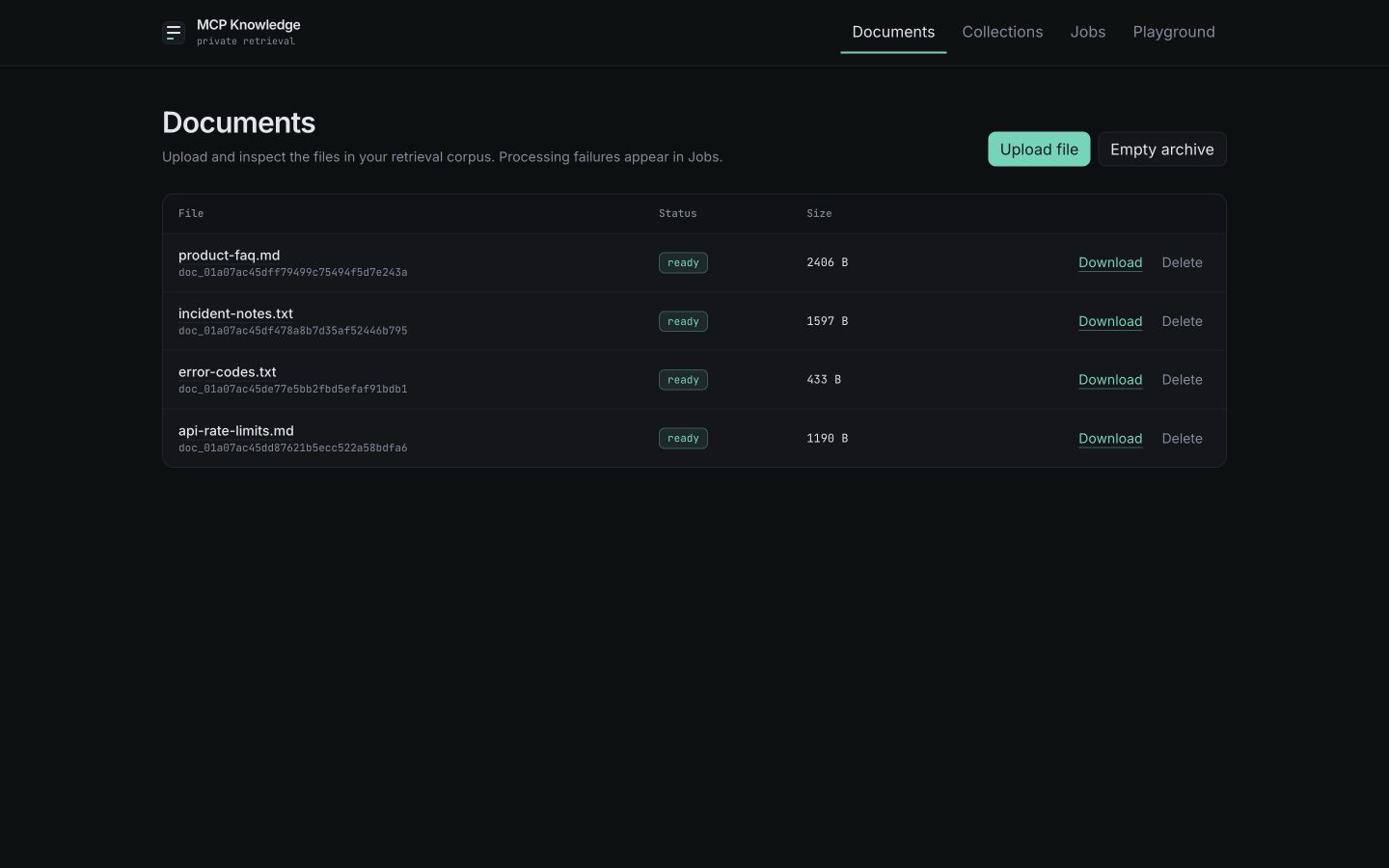
These screens come from the same clean local instance seeded with the repository fixtures.
The built-in playground
Test retrieval before you wire it in.
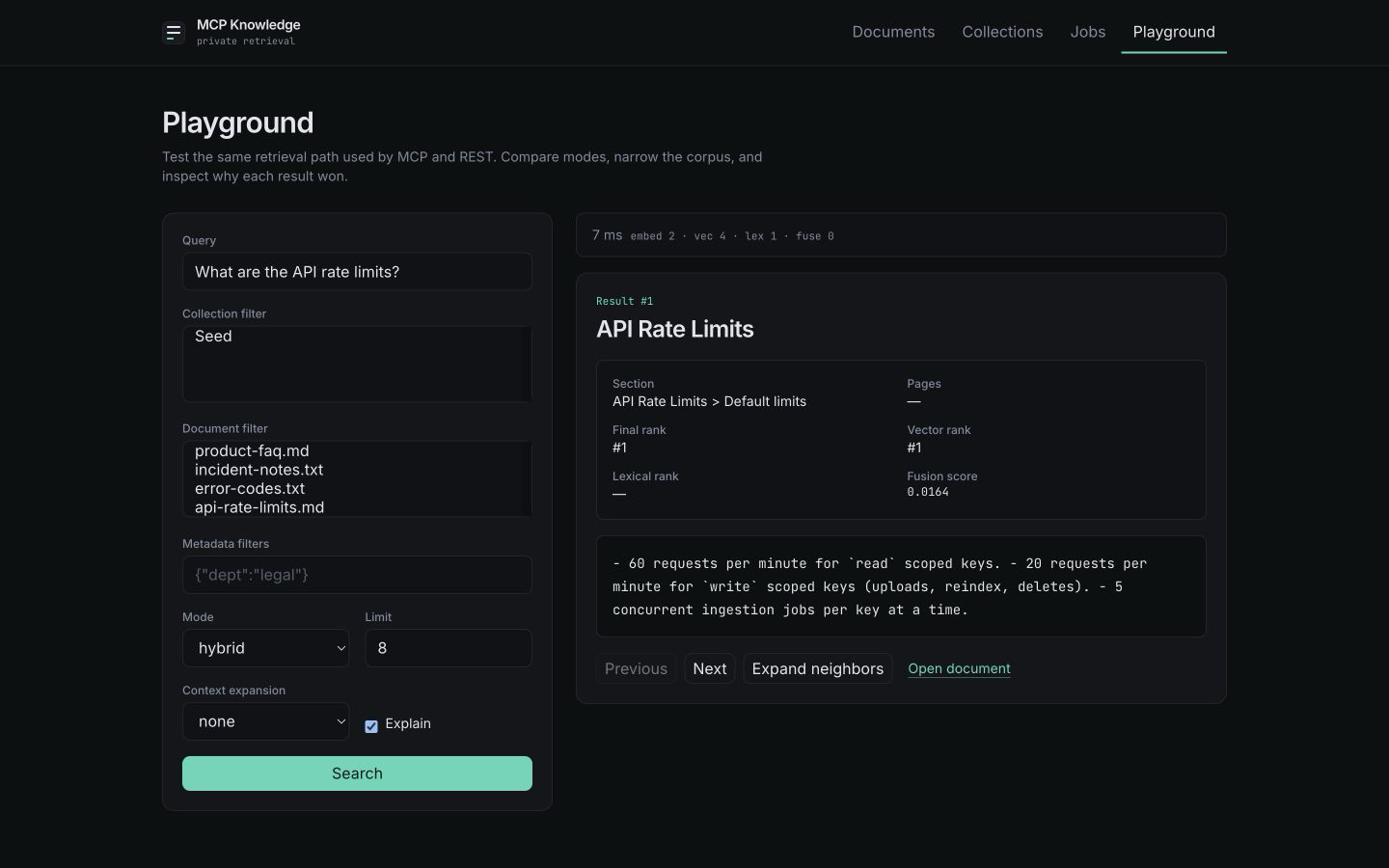
Search your real corpus from the browser using the same retrieval path as MCP and REST. Tune the query, filters, mode, result limit, and context before you write integration code.
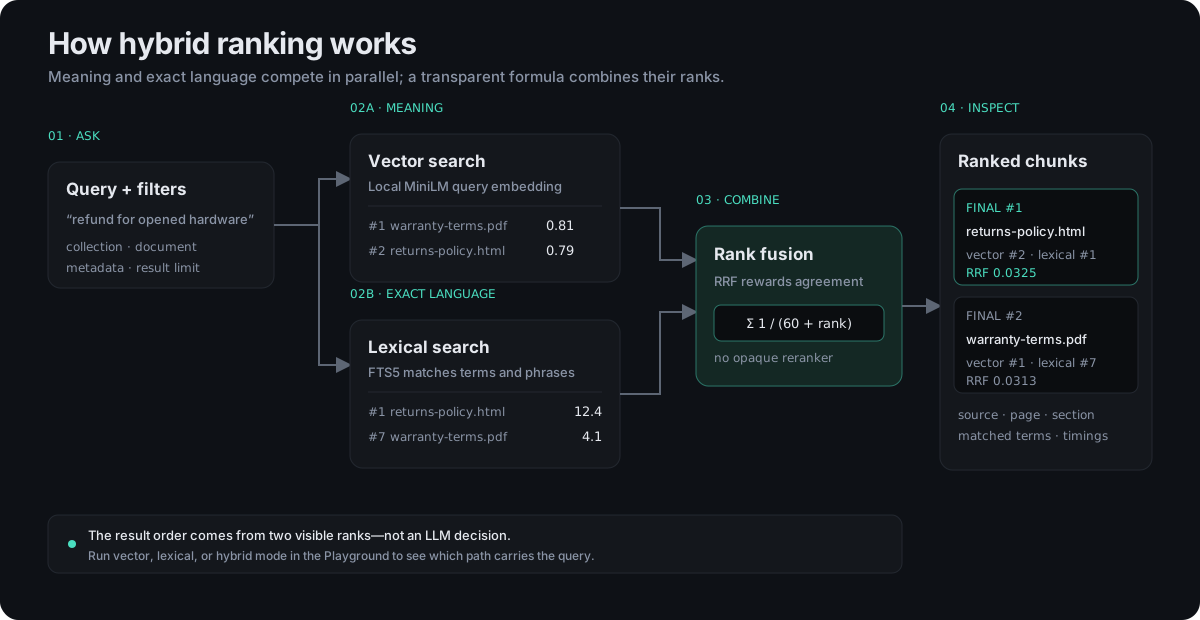
- Compare three retrieval modes Switch between hybrid, vector, and lexical search to see which method is carrying a query.
- Filter the corpus precisely Limit searches by collection, document, or metadata without constructing API payloads by hand.
- Inspect context and provenance Expand neighboring chunks and trace each result back to its document, heading, page, or section.
- Explain rank and latency See vector rank, lexical rank, fusion score, matched terms, and per-stage timing for every search.
…hardware showing signs of use is covered by the limited warranty rather than the return window, and is repaired or replaced at our discretion…
How it works
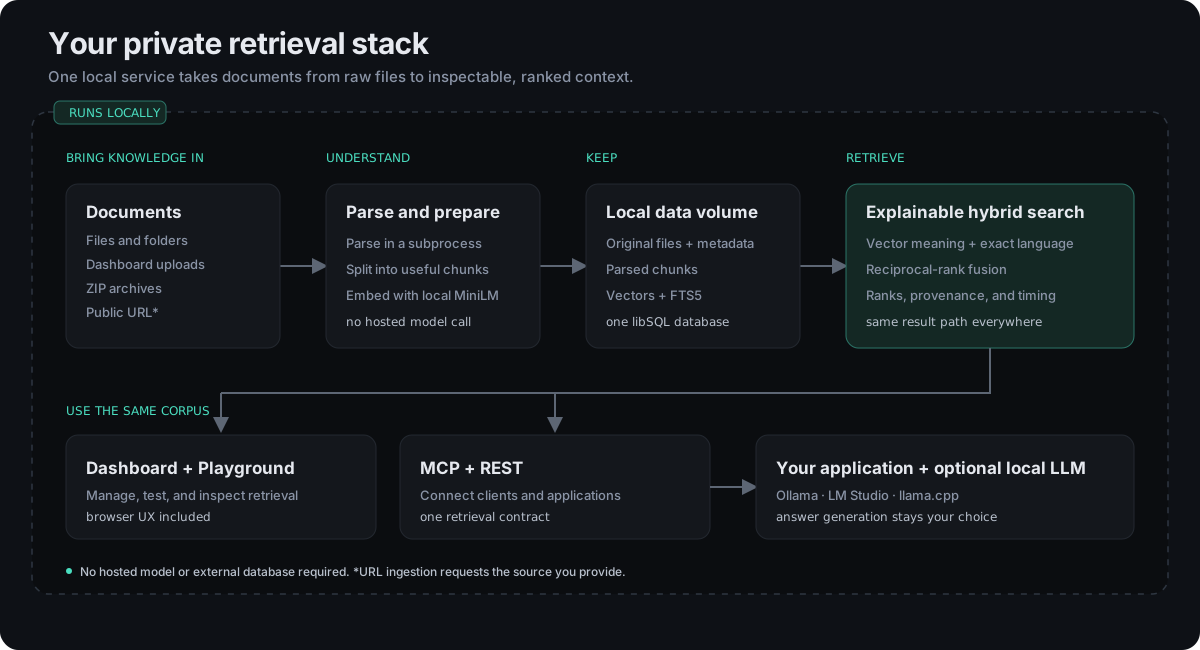
From file to retrieval, entirely on your machine.
Nothing in this path calls a hosted model, and the costly parsing and embedding stages are isolated from the process serving requests.
What you get
A complete local workflow, not just an endpoint.
Dashboard operations
Upload, download, reindex, and remove documents; organize collections; inspect parsed chunks; and manage the corpus without a CLI.
Visible ingestion
Watch documents move from processing to ready, follow folder scans and ZIP imports, and retry failed jobs with actionable error guidance.
Retrieval playground
Compare search modes, apply filters, expand context, and inspect provenance, ranks, matched terms, and timing on your own documents.
MCP and REST
The dashboard and playground exercise the same corpus and retrieval behavior exposed to MCP clients and custom applications.
Local LLM ready
Pair the retrieval service with an MCP-capable local application and an Ollama, LM Studio, or llama.cpp model runtime.
One private container
Local embeddings, originals, chunks, and indexes run together with no hosted model API or external database required.
End-to-end local RAG
Keep retrieval and generation on your machine.
Connect MCP Knowledge to an MCP-capable local application backed by your preferred local model runtime, or call REST from an application you control.
A fully local deployment is possible: bind every component to loopback and avoid external services, and document content does not need to leave the machine. URL imports make outbound requests, and any remote model or telemetry configured in your chosen client has its own privacy boundary.
A focused retrieval layer
Choose it when control matters more than orchestration.
MCP Knowledge is intentionally smaller than an agent framework and more complete than a retrieval library.
Good fit
- Your documents need to remain on hardware you control
- MCP clients and REST applications need the same corpus
- You want to inspect why each result was ranked
- You want one container rather than a retrieval stack to assemble
Use something else if
- You need a chatbot or agent framework out of the box
- You need multi-tenant or distributed deployment in v0.1
- You need OCR for scanned PDFs
- You need hosted-scale reranking or answer generation
Quick start
Run the published image.
Docker Engine or Docker Desktop is the only prerequisite — Bun, the parser, and the embedding model all ship inside the image.
Run it
$ docker run -d \ --name mcp-knowledge \ --restart unless-stopped \ -p 127.0.0.1:3000:3000 \ -v mcp-knowledge-data:/app/data \ ghcr.io/raysca/mcp-knowledge:0.1 $ curl --fail http://127.0.0.1:3000/health
Connect an MCP client
{ "mcpServers": { "knowledge": { "url": "http://127.0.0.1:3000/mcp" } } }
- Open the dashboard at
http://127.0.0.1:3000. Upload a file, watch it become ready, then validate retrieval at/playground. :0.1follows the v0.1 release line. To select this release explicitly, use the versioned:0.1.0tag.- MCP tools are read-only —
search_documents,get_document,get_chunk,list_documents,list_collections. Use REST to write. - The loopback-only setup above has no authentication. Set
DASHBOARD_PASSPHRASEand generate an API key before exposing it to a LAN, proxy, or tunnel. - Everything persists in the
mcp-knowledge-datanamed Docker volume. Removing the container does not remove its data.
Operate it visually. Prove it locally. Connect it anywhere.
The dashboard manages your corpus, the playground explains retrieval, and MCP or REST brings the results to your chosen local model.